 Chronicle
Guide
What each part of Chronicle does and how to use it from the web UI, the CLI, and an agent.
- Recording
- The knowledge graph
- Context packs
- Contexts and context files
- Teaching a workflow
- Workflows and pipes
- Search and Ask
- Exports
- LLM refinement
- MCP tools, resources, prompts
- REST API
- CLI reference
- Configuration
- Your data
Recording
A session runs for a set duration or until you stop it. Start one from the Record page of the web UI, from the CLI, or let an agent call start_recording.
chronicle record 30m --label "file an expense report"
chronicle record 2h --interval 10 --detach     # sample every 10 s; a running server records it
chronicle sessions
chronicle stop
Every 5 seconds by default the recorder samples the front app and window, the browser URL and tab title (macOS), screen text, and a screenshot. It logs the system events app_switch, window_focus, url_change, clipboard, idle_start/idle_end, and session_start/session_stop. Screen text comes from the macOS Accessibility tree, or from tesseract OCR when an app exposes no text (and always on Linux and Windows).
Keystrokes are never recorded. Password managers, System Settings, and private browsing windows are skipped, and emails, API keys, JWTs, and card numbers are redacted before anything is written. Capture interval, idle threshold, screenshots, OCR, clipboard, redaction, and retention are settings in the UI.
The knowledge graph
Each session gets its own graph shard, extended while recording and rebuilt once when it ends. Frames captured outside a session go into hourly shards. The all-history graph aggregates the shards, counting older ones less (72-hour half-life by default), so it stays focused on current work. Deleting a session just drops its shard.
| Nodes | apps, windows, sites, pages, search queries, topics, files, tickets (BILL-142), PRs, code identifiers, people, projects, customers, meetings, sessions, tasks |
|---|---|
| Edges | has_window, visited, on_site, shows, searched, about, co_occurs, switched_to and then (workflow transitions), spoke_in, discussed, copied, typed, captured |
Topics are keyphrases such as "Acme export", scored by frequency, spread, casing, position, and dwell time. Tasks are stretches of activity segmented by topic. Every node and edge records the time spent on it and the frames it came from.
chronicle graph show [--session N]
chronicle graph find "acme"
chronicle graph node topic:acme-export
chronicle graph tasks --since "2h ago"
chronicle graph merges               # near-duplicate nodes the build merges
chronicle graph build --full         # re-extract every shard
Context packs
get_context(task), chronicle context, and GET /context all return the same pack: the current screen, recent activity blocks and system events, habitual app transitions, the subgraph relevant to the task, and the cited frames.
chronicle context "finish the Acme export"
chronicle context --session 3 --json
chronicle context --minutes 30
Contexts and context files
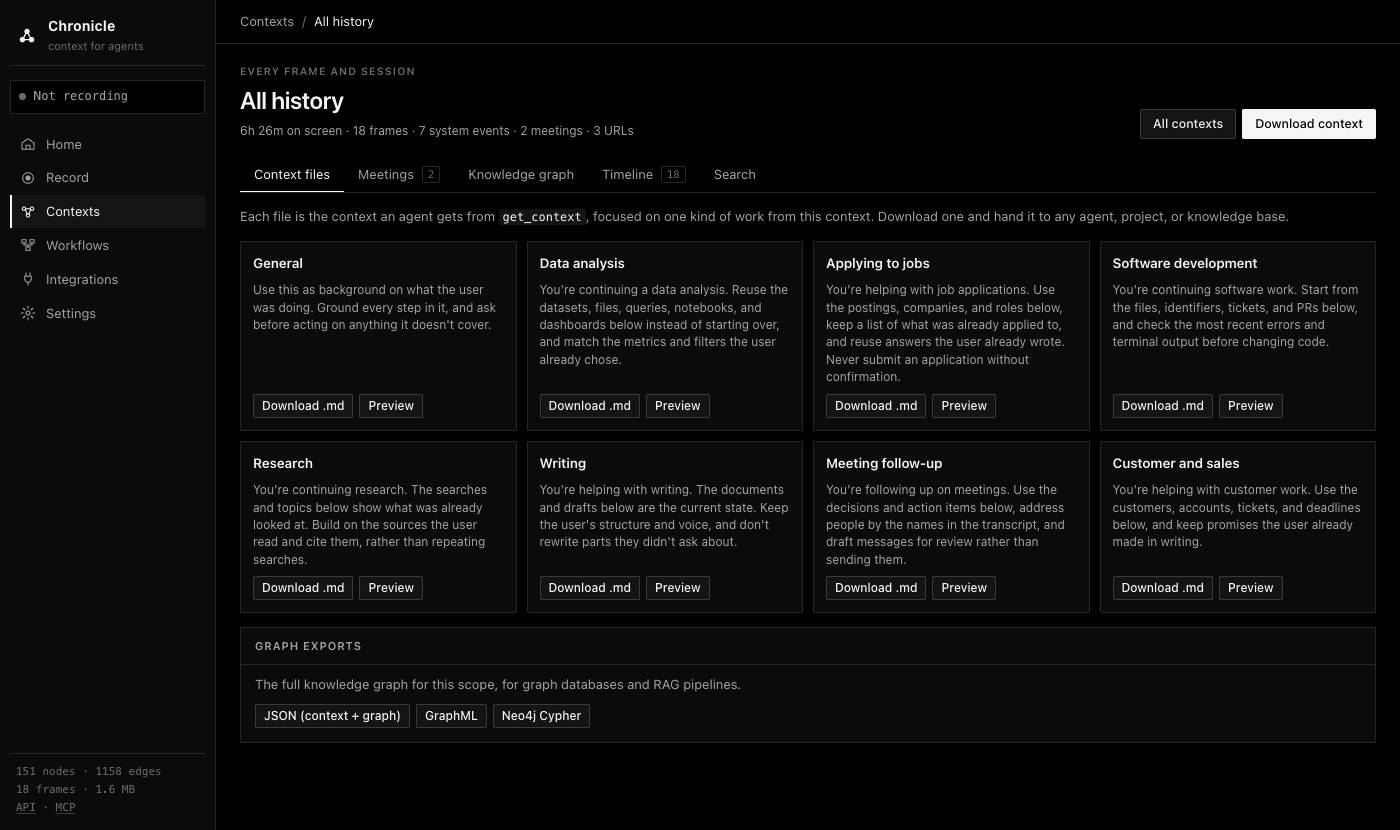
The Contexts page holds each recording, all history, and contexts you generate from a task, a time range, or a recording. Each context has five tabs: context files, meetings, the knowledge graph, a timeline of frames and events, and search.
Context files are Markdown documents for eight kinds of work: general, data analysis, job applications, coding, research, writing, meeting follow-up, and customer work. With an OpenAI key, a model writes each one with the sections that kind of work needs and an "Open threads" list. Without a key, they're assembled from the recording. Download one and hand it to an agent, a Claude or ChatGPT Project, or NotebookLM.
Teaching a workflow
Record yourself doing a task once, check what the agent will see, then ask it to repeat the task with the learn_from_recording prompt:
chronicle record 5m --label "file an expense report"
chronicle context --session 1
Then tell the agent: "Use the learn_from_recording prompt for session 1 and do it again for this receipt."
Workflows and pipes
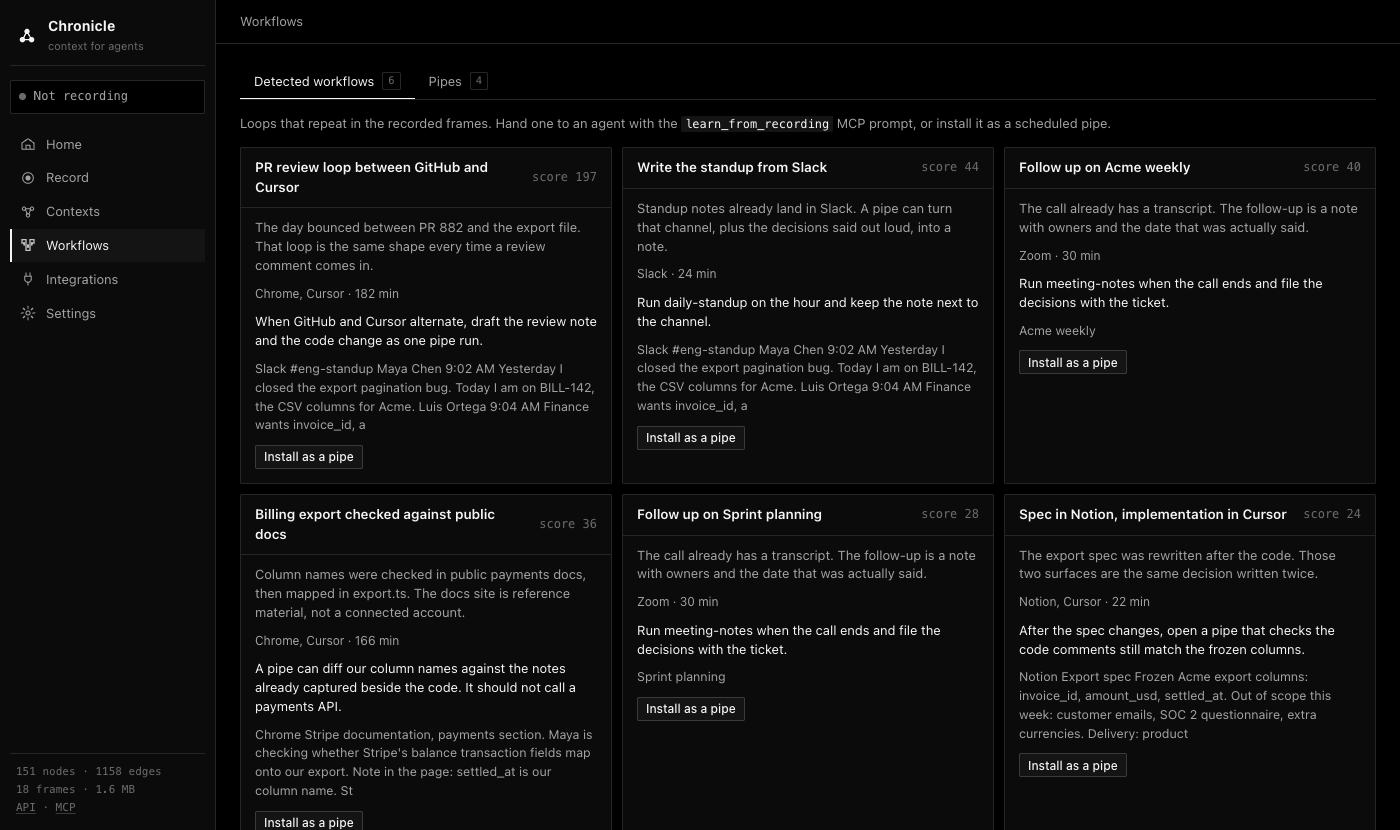
The Workflows page lists loops that repeat across recordings, such as moving between a PR and the file it changes, with the apps, time spent, and evidence for each. You can hand one to an agent with learn_from_recording or install it as a scheduled pipe.
Search and Ask
chronicle search and the search_history tool run full-text search over screen text, events, transcripts, and memories. chronicle ask and the Ask box answer a question from matching history, using the provider you configure in Settings, which sends that history to the provider.
chronicle search "invoice_id"
chronicle ask "what did Maya say about the export columns?"
Exports
Any context exports as Markdown, JSON (context plus graph), GraphML, or Neo4j Cypher, from the UI or the API:
chronicle graph export --session 1      # JSON
curl "http://127.0.0.1:3030/contexts/export?format=cypher"
LLM refinement
The heuristic graph knows apps, pages, tickets, files, and identifiers, but it can't tell that "Crusoe" is a company or that a page is a job posting. When an OpenAI key is available, a model refines each recording when it ends. It reads the heaviest nodes with their evidence and replies through strict function calls: add_entity, retype_node, rename_node, merge_nodes, add_relation, add_trait, set_activity, and drop_node.
- Each operation is validated against the schema and existing node ids. Rejected ones go back to the model in the next round, for up to
--roundspasses (default 2). - Accepted operations are stored and replayed after every rebuild, so refinement survives
graph build.--resetremoves them. - Model-made nodes and edges carry
source: "llm"; relations carry a confidence and an evidence quote. - Responses are cached by prompt and model, unchanged scopes are skipped unless you pass
--force, and failures never stop a recording.
chronicle graph tune --session 1 [--rounds 2 --force --reset]The model is gpt-4.1-mini unless you set CHRONICLE_LLM_MODEL. GET /llm/status reports the provider, model, and last error.
MCP tools, resources, prompts
| Tool | What it does |
|---|---|
get_context | Context pack for a task |
search_history | Full-text search over screen text, events, transcripts, and memories |
query_graph, get_entity, graph_summary | Find entities, walk their neighbors with evidence frames, get counts and top transitions |
list_tasks | Timeline of tasks grouped by topic |
get_frame | One frame with nearby events and audio; include_image=true attaches the screenshot |
start_recording, stop_recording, list_sessions | Let the agent record a demonstration |
rebuild_graph, activity_summary, list_meetings | Maintenance and summaries |
tune_graph | Run LLM refinement on a scope |
search, fetch | ChatGPT connector and deep-research interface |
Resources: chronicle://context/current, chronicle://graph/summary, chronicle://sessions, chronicle://context/session/{id}, and chronicle://frame/{id}. Prompts: use_my_computer_context(task) and learn_from_recording(session_id).
REST API
chronicle serve documents every route at http://127.0.0.1:3030/docs. The most useful ones:
| Route | Purpose |
|---|---|
POST /sessions {duration, label} | Start a recording |
GET /context?task=&format=markdown | The get_context pack |
GET /graph, GET /graph/node?id= | Graph and single-node lookups |
GET /contexts/file?preset=… | A context file, and which model wrote it |
GET /contexts/export?format=md|json|graphml|cypher | Exports |
POST /add | Push frames, events, or transcripts from your own capture, such as a Whisper audio pipeline |
CLI reference
chronicle serve [--host --port]                       web UI, REST API, and HTTP MCP
chronicle record <duration> [--label --interval --detach]
chronicle stop [id] · chronicle sessions
chronicle graph build|show|find|node|export [--session N]
chronicle graph tasks [--session N --since "2h ago" --json]
chronicle graph merges [--session N --threshold --json]
chronicle graph tune [--session N --rounds 2 --force --reset]
chronicle context [task] [--minutes N --session N --json]
chronicle mcp [stdio|clients|config <client>|install <client> [--path --dry-run --no-record]]
chronicle search <q> · chronicle ask <question> · chronicle status · chronicle doctor · chronicle demo
Configuration
| Variable | Default | Meaning |
|---|---|---|
CHRONICLE_HOME | ~/.chronicle | Database, screenshots, pipes, and lock file |
CHRONICLE_TOKEN | unset | Require this token on the HTTP API and MCP |
CHRONICLE_PUBLIC_URL | http://127.0.0.1:3030 | Base URL for links and remote client snippets |
CHRONICLE_DEMO=1 | off | Load the sample workday into an empty database on start |
CHRONICLE_DISABLE_CAPTURE=1 | off | Never record from this process |
CHRONICLE_HALF_LIFE_HOURS | 72 | Decay half-life for the all-history graph; 0 or off disables it |
CHRONICLE_LLM | automatic | openai or off; unset means on whenever an OpenAI key is available |
CHRONICLE_LLM_MODEL | gpt-4.1-mini | Model for refinement and context files |
OPENAI_API_KEY, OPENAI_BASE_URL | unset | Credentials and endpoint for the openai provider |
Your data
Everything is in CHRONICLE_HOME. Set how long frames are kept under Settings (0 keeps them forever), delete a time range from the UI or POST /data/delete-range, or delete a session to drop its graph shard. The full policy is in PRIVACY.md.